
How to use Rechargly when your firm uses Apron in Xero
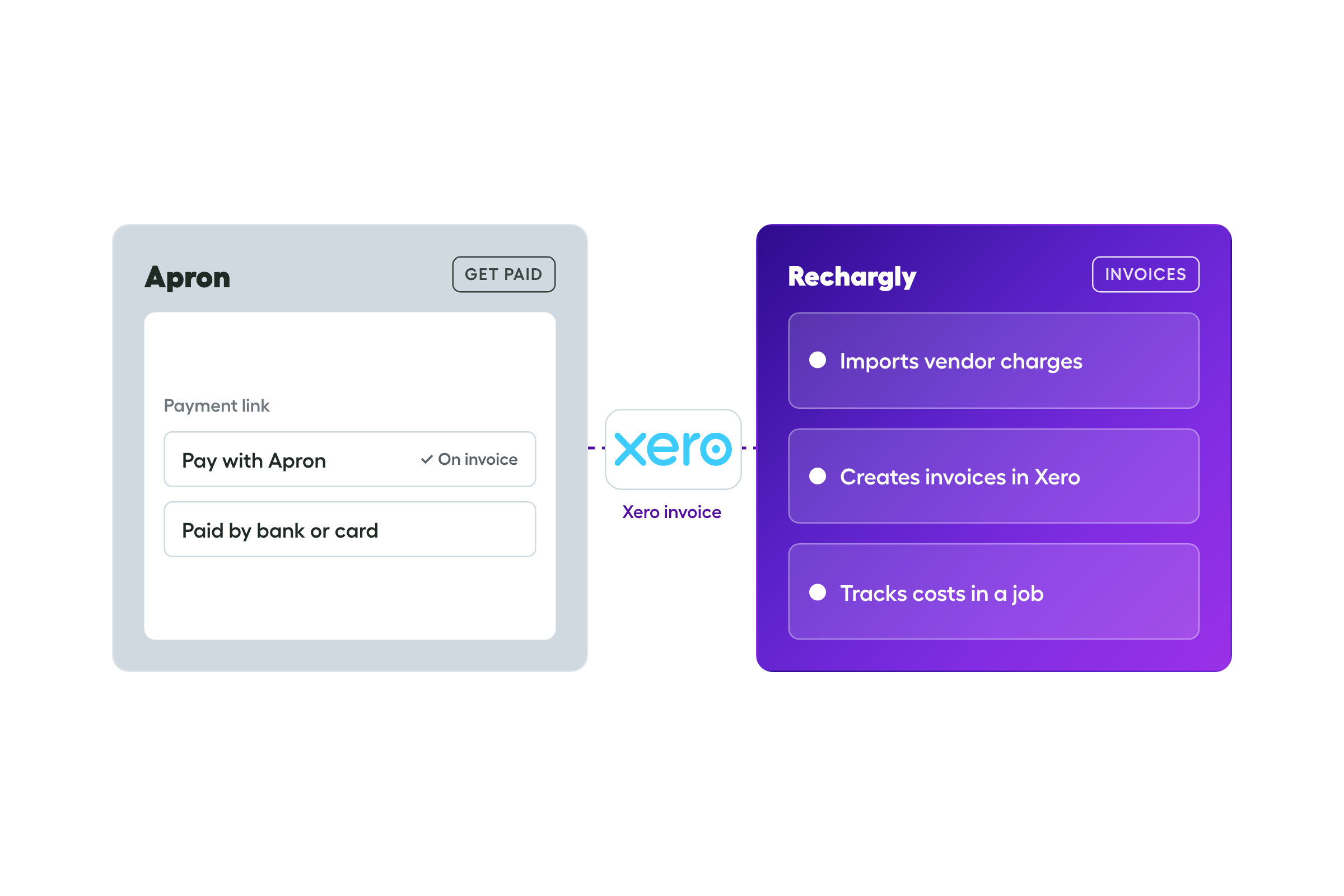
TL;DR. Apron can stay. If your clients pay your invoices through an Apron payment link, there are three ways to recharge software, and what changes is how much of the work sits with your team. Apron's Get paid link can carry the payment in the first two. Rechargly can raise the invoices, or collect automatically as well. None of them is wrong. It's a trade-off.
Apron and Rechargly do different jobs, so they sit side by side. Apron is built for accounts payable: invoice capture and bill pay. Its Get paid link is how clients pay your invoices, by bank or card. Rechargly works out what each client owes for software, raises the invoice and can collect it automatically. Apron keeps doing what you use it for today. The only question is who handles the software invoices, and how they get paid.
The jobs that need doing
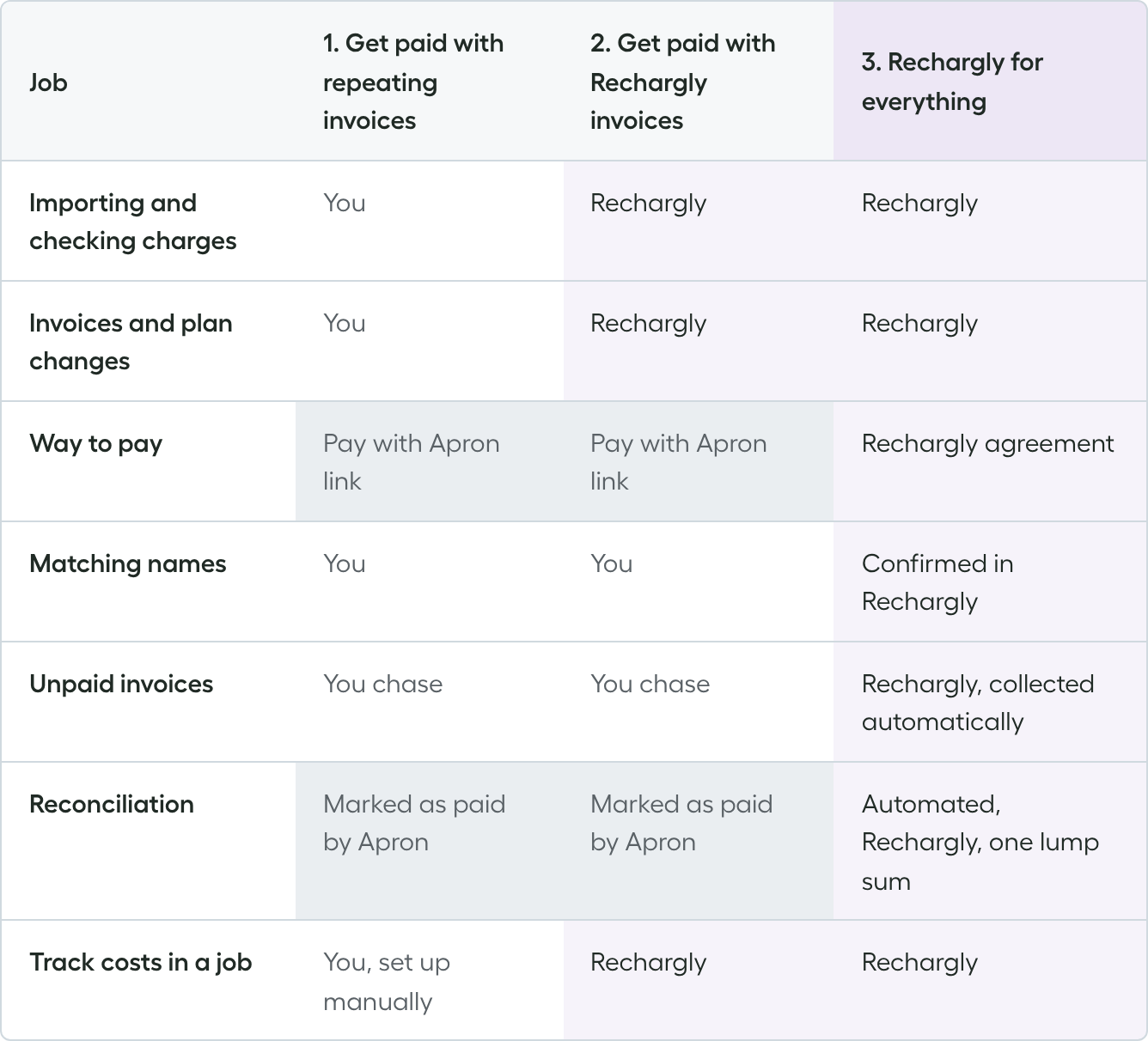
Every month, recharging software means the same seven jobs:
- Importing vendor charges and checking the totals
- Creating invoices and keeping them right when plans and prices change
- Putting a way to pay on every invoice
- Making sure client names match across Xero and the vendors
- Chasing invoices that haven't been paid
- Reconciling what lands in the bank
- Tracking costs in a job in your practice manager
The three setups differ in who does them.
1. Apron Get paid with Xero repeating invoices
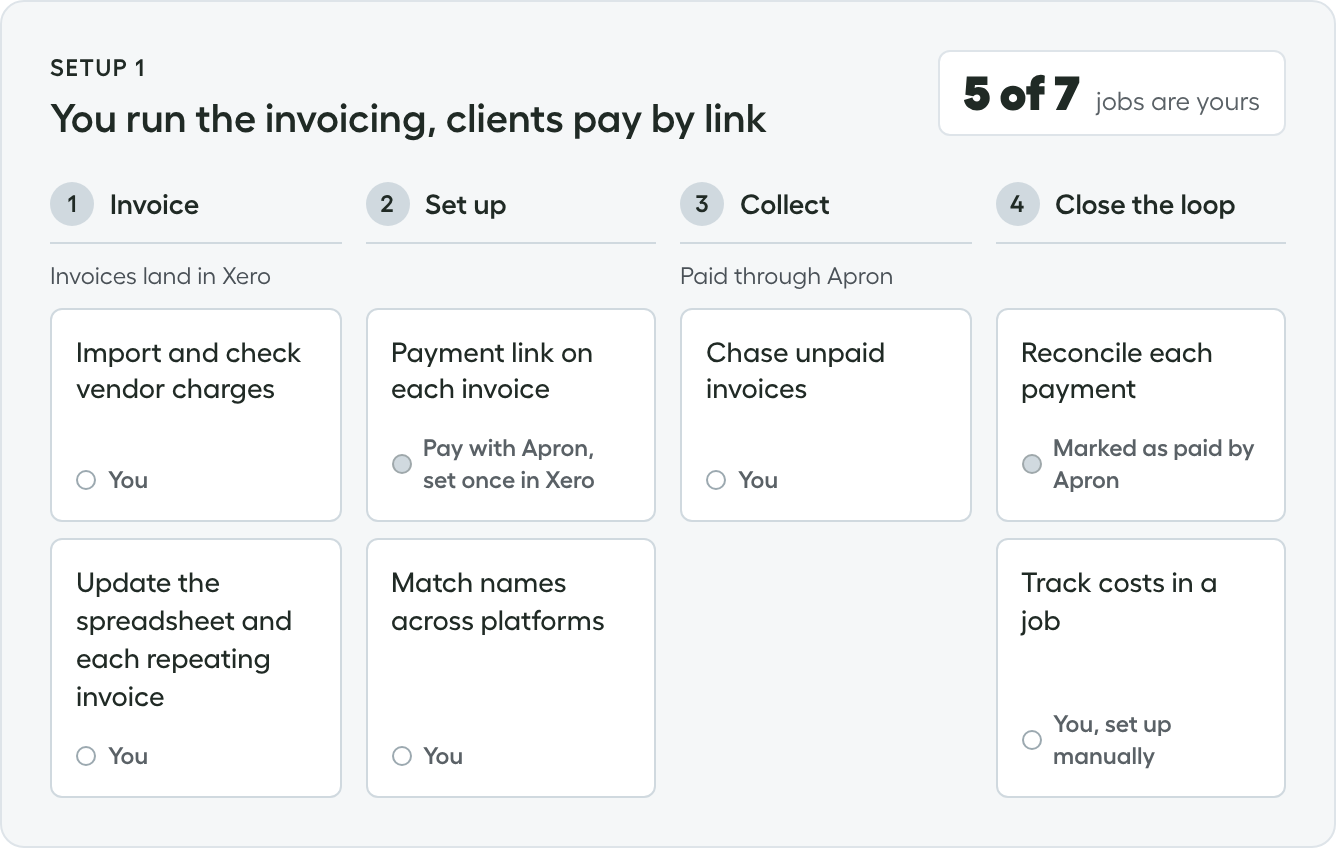
You set up a repeating invoice in Xero for each client and keep a spreadsheet of what each client should pay. Each invoice carries a Pay with Apron button, and the client pays by bank or card, with no login.
You do
- Add your Get paid link to Xero as a custom payment link
- Export the vendor charges and total them
- Update the spreadsheet and each repeating invoice when a plan or price changes
- Keep client names matching across Xero and the vendors
- Chase the clients who don't pay
- Set costs up in a job manually, or they don't reach it
Apron does
- Puts a Pay with Apron button on each invoice, with the amount and invoice number already filled in
- Sends the money straight to your bank account once the client pays
- Marks the invoice as paid in Xero, as long as Apron is synced with Xero
Best for: a short client list where plans rarely move and clients pay on time.
Trade-off: everything rests on your spreadsheet, your team's time and your clients remembering to pay.
2. Apron Get paid for payment, Rechargly for the invoices
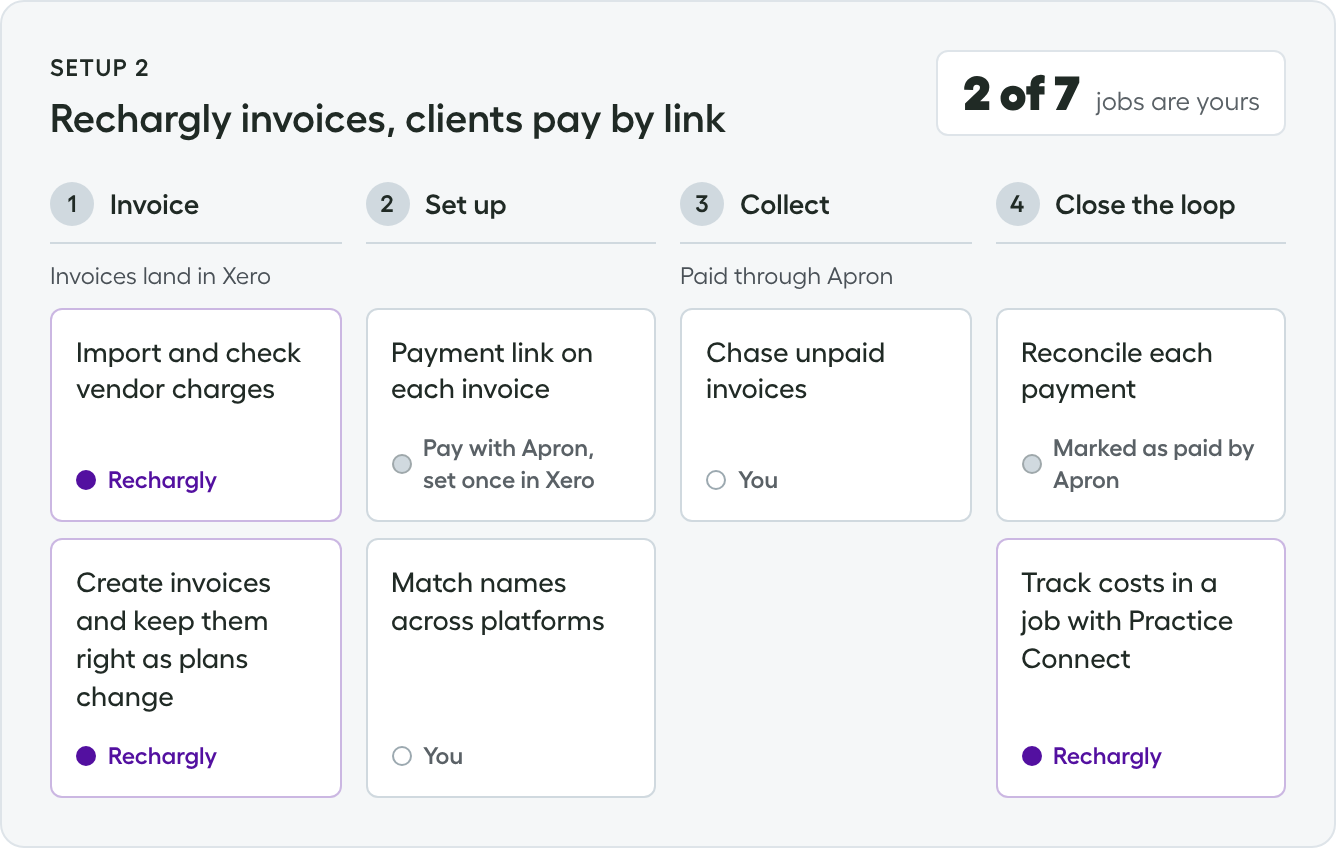
Rechargly imports the vendor charges, works out what each client owes and creates the invoices in Xero. Clients pay through the Pay with Apron button, the way they do today.
You do
- Set Apron Get paid as the payment service on the invoice theme Rechargly uses
- Keep client names matching across Xero and the vendors
- Chase the clients who don't pay
Rechargly does
- Imports and checks the vendor charges
- Creates the invoices and keeps them right when plans and prices change
- Tracks costs in a job with Practice Connect
Apron does
- Puts the Pay with Apron button on each invoice
- Marks each invoice as paid in Xero
Best for: taking the invoicing off your team without changing how clients pay.
Trade-off: clients still pay each invoice themselves, so you still chase the ones who don't.
3. Rechargly for everything
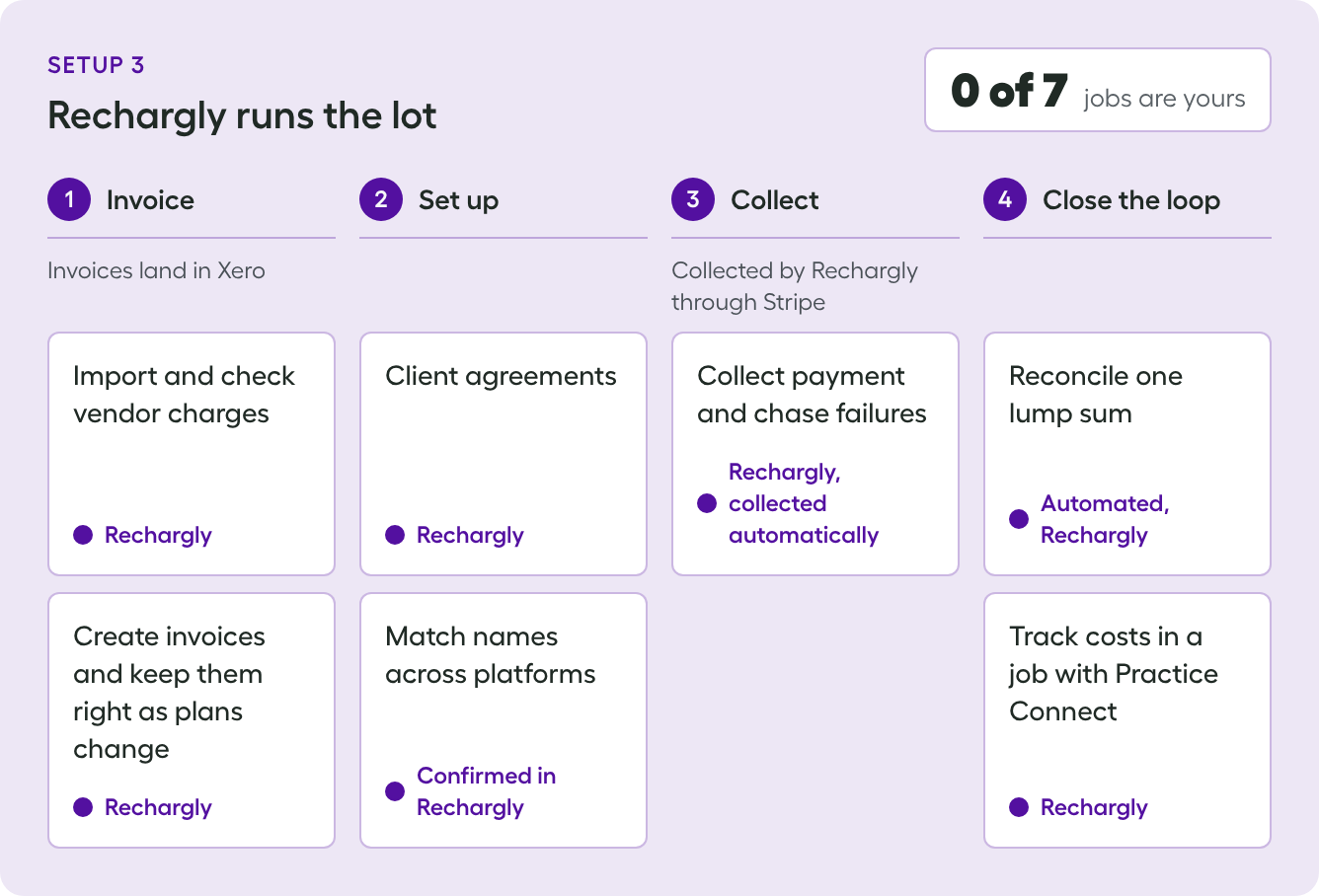
Rechargly creates the invoices and collects the funds through Stripe, by card or bank. Clients accept an agreement once, and after that each invoice is collected automatically. They get the invoice and receipt afterwards.
You do
- Review the month
- Plan a short message to clients about the change
Rechargly does
- Imports and checks the vendor charges
- Creates the invoices and keeps them right when plans and prices change
- Sends the client agreements and confirms names match
- Collects each invoice automatically and handles failed payments
- Reconciles one lump sum deposit through a clearinghouse
- Tracks costs in a job with Practice Connect
Best for: collecting software invoices automatically, so you stop chasing them.
Trade-off: software billing moves off the payment link and onto a Rechargly agreement, so clients see it differently. Each client accepts the agreement once.
Who does what
The bottom line
The trade-off is your time against the client experience.
- Option 1 is fine while the client list is short and the spreadsheet holds up.
- Option 2 keeps things as clients know them. Go with it if your clients pay on time and you'd rather not change how they pay. The Pay with Apron button stays on the invoice, and Rechargly takes the importing and invoicing off your team.
- Option 3 gives you your time back. If you're tired of chasing software invoices, it collects them automatically.
If you're on option 1 or 2 and want to move to option 3, let us know and we'll set it up with you.
Frequently asked questions
Can I keep using Apron and still use Rechargly?
Yes. Rechargly can create the invoices in Xero while clients keep paying through the Pay with Apron button. A Xero branding theme carries Get paid on each invoice, so clients pay the way they do today.
Does anything change for bill pay?
No. Rechargly only touches the software invoices you raise to clients. Invoice capture, bill pay and everything else you use Apron for carries on as it is.
What does Rechargly take off my team if clients keep paying through Apron?
Importing and checking vendor charges, creating invoices and keeping them right as plans and prices change, and tracking costs in a job with Practice Connect. Chasing unpaid invoices stays with you.
Can clients still pay by bank?
If you keep Get paid on the invoice, yes. Nothing about how they pay changes. Pay by bank stays free for you and for them.
Who pays the card fees?
That's your Get paid setting. You choose whether you or the client covers card fees, and it stays as you've set it when Rechargly creates the invoices. If you do collection through Rechargly, there will be processing fees.
Who chases unpaid invoices?
With a payment link, you do, because the client has to pay each invoice themselves. If Rechargly collects, payment is taken automatically under the client's agreement and we handle any that fail.
Do my clients have to do anything if I move collection to Rechargly?
Yes, once. Each client accepts a Rechargly agreement, and after that payment is collected automatically.
How does reconciliation work when Rechargly collects?
With Apron, invoices paid through Get paid are marked as paid in Xero, as long as Apron is synced with Xero. With Rechargly you get one lump sum deposit, reconciled through a clearinghouse.
How do I track costs in a job in my practice manager?
With Practice Connect, costs can be pushed to a Rechargly managed job or to an existing job that you've already created.