
How to use Rechargly when your clients are set up on Ignition in Xero
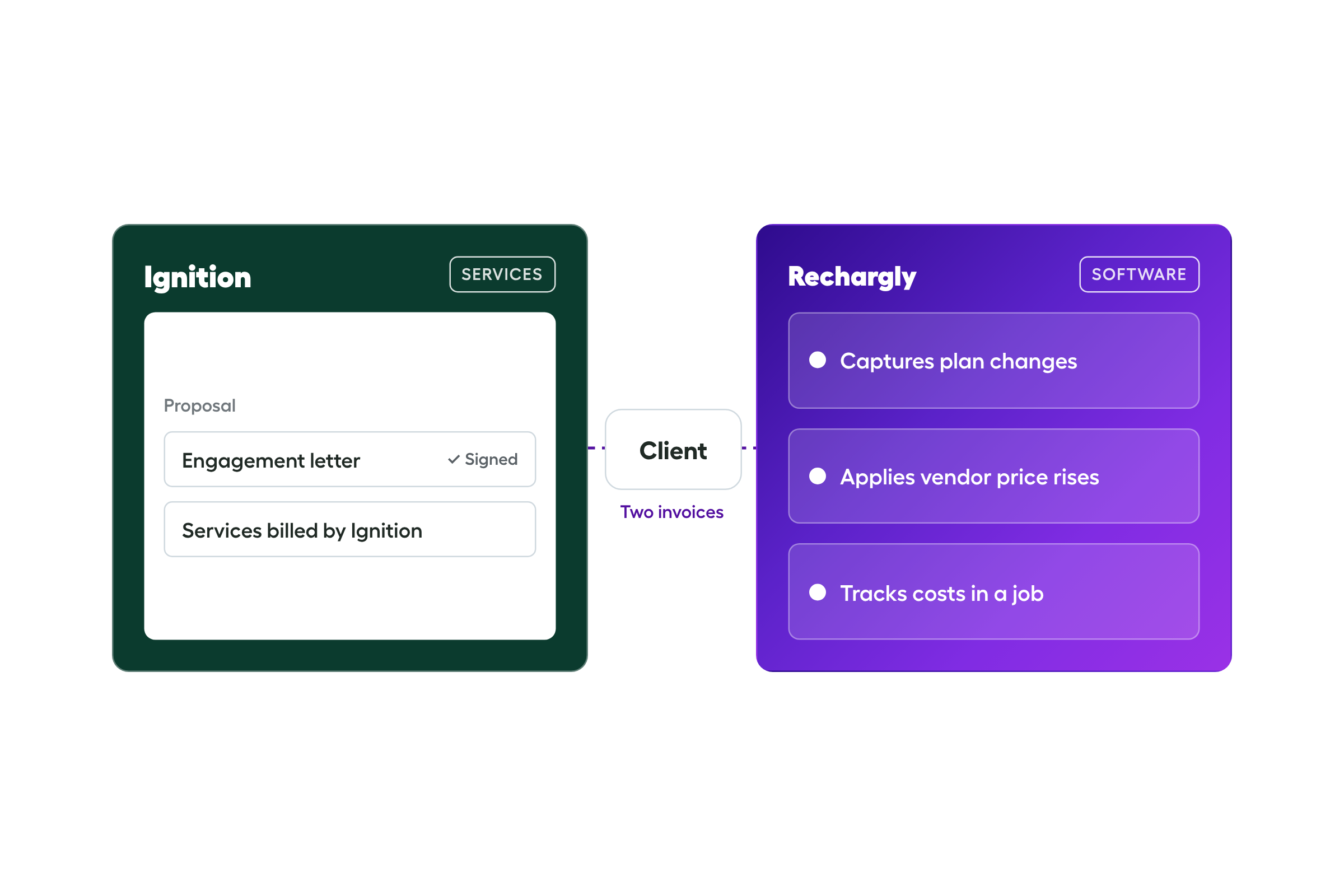
TL;DR. You can bill software through Ignition, which collects well. The catch is that a proposal doesn't change when software does, so someone has to keep it right. There are three ways to set it up. In the first two the upkeep is yours. In the third, Rechargly runs the software billing and Ignition stays for your services. It's a trade-off.
Ignition is built for proposals and engagement letters. Plenty of practices also use it to bill software, because the client is already there and the payment is already set up.
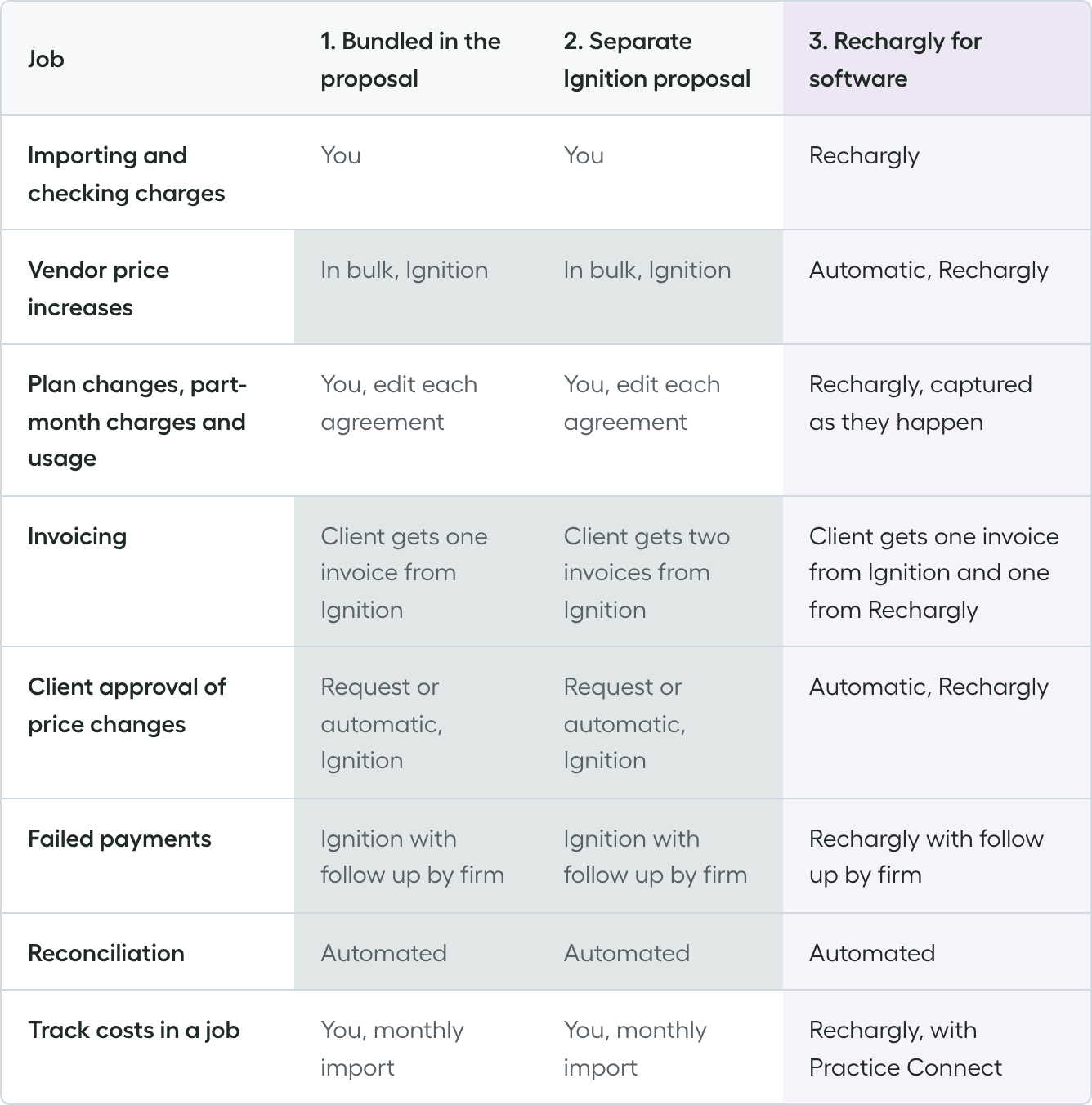
The question isn't whether it works. Software moves all year, and a proposal doesn't. Plans change, vendors raise prices and clients add or drop products. Here are the jobs that creates, and who does them in each setup.
The jobs that need doing
Whichever setup you pick, these jobs exist:
- Importing vendor charges and checking the totals
- Passing on vendor price increases
- Handling plan changes, part-month charges and usage-based billing
- Getting clients to accept changes to their proposal
- Chasing failed payments
- Reconciling what lands in the bank
- Tracking costs in a job in your practice manager
The three setups differ in who does them.
1. Software bundled into your Ignition proposal
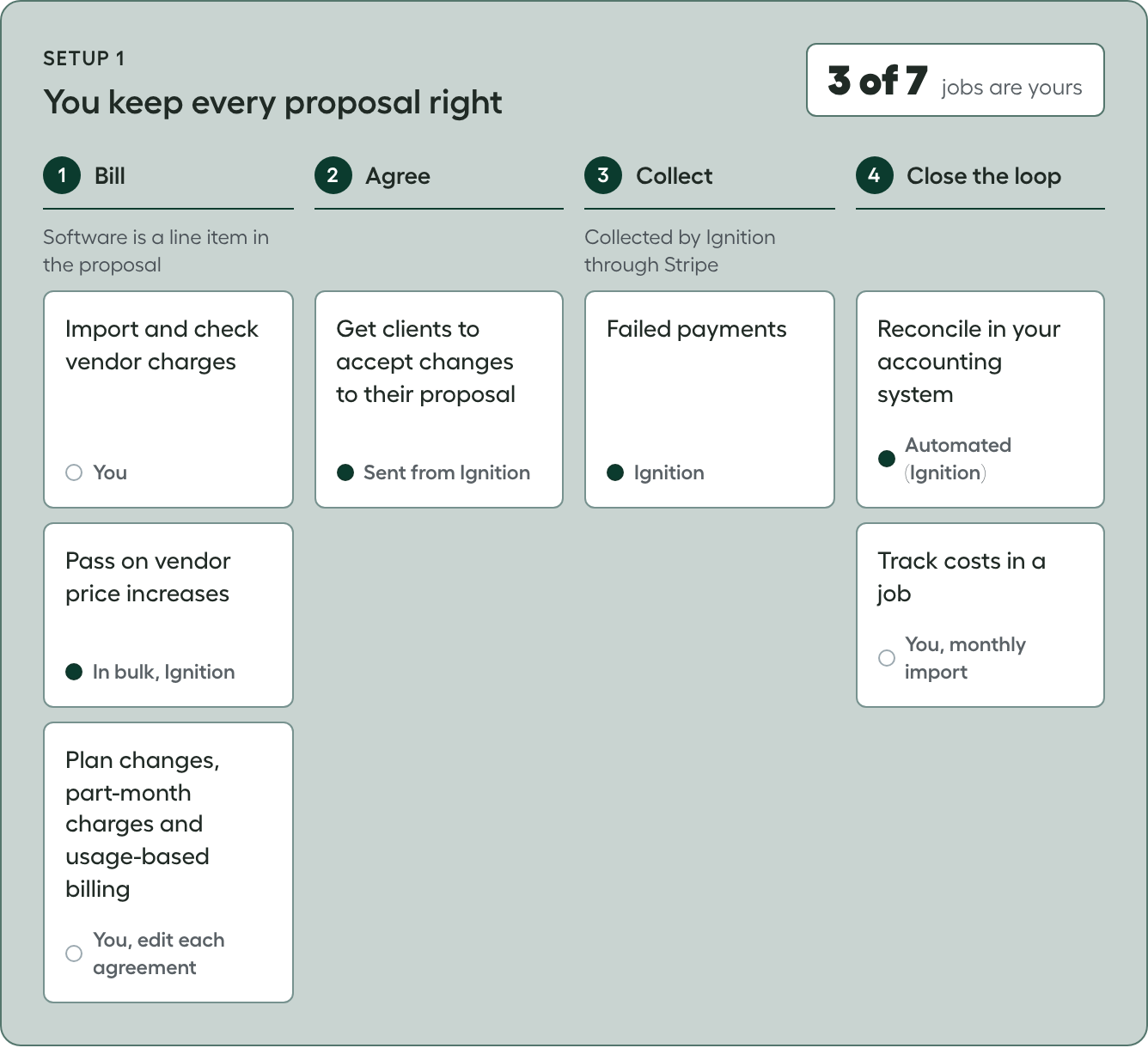
You set up each software plan in your service library as a recurring service, with its price, and add it to the client's proposal. Services and software share one proposal and one invoice, and Ignition collects it automatically, by card or direct debit.
You do
- Import the vendor charges every month and check them against the proposals
- Edit that client's agreed services when a client changes plan, starts or stops part way through a month, or uses a vendor that bills on usage
- Follow up if a payment retry fails
- Import costs into a job every month. It's easy to skip
Ignition does
- Applies a price update to every agreement that has the service, once you change it in your service library
- Sends bigger changes to the client as a change order to approve
- Collects automatically, emails the client and retries failed payments
- Marks the invoices paid in Xero, and a bank rule reconciles the payouts
Best for: firms where plans and prices stay put, clients don't spend much on software and you bill one or two vendors.
Trade-off: without a strict process, changes get missed and you absorb the difference. A vendor price rise can also read as a rise in your fees.
2. Software on its own Ignition proposal
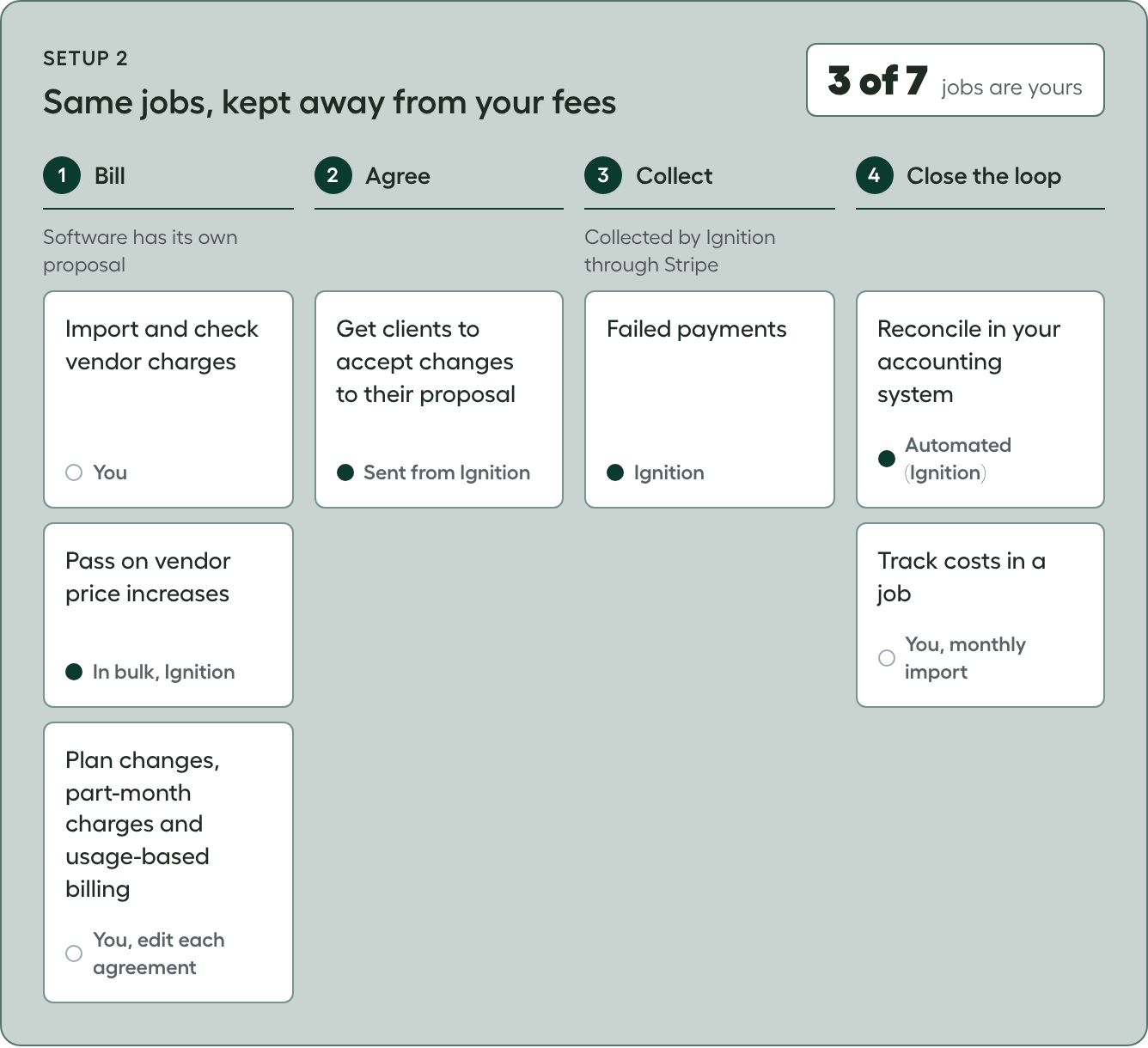
You keep Ignition for collection and move the software onto its own proposal, separate from your services. Ignition still sends the invoice and collects automatically. The jobs don't change. What changes is how clients see it: a vendor price rise doesn't read as a rise in your fees, and you're not reopening your engagement letter every time software moves.
You do
- Import and check the vendor charges
- Handle plan changes, part-month charges and usage
- Follow up if a payment retry fails
- Import costs into a job every month
Ignition does
- Applies a price update to every agreement that has the service, once you change it in your service library
- Sends bigger changes to the client as a change order to approve
- Collects automatically, emails the client and retries failed payments
- Marks the invoices paid in Xero, and a bank rule reconciles the payouts
Best for: keeping software away from your fees while Ignition keeps collecting.
Trade-off: it's the same work as option 1, and clients get two invoices from Ignition.
3. Ignition for services, Rechargly for software
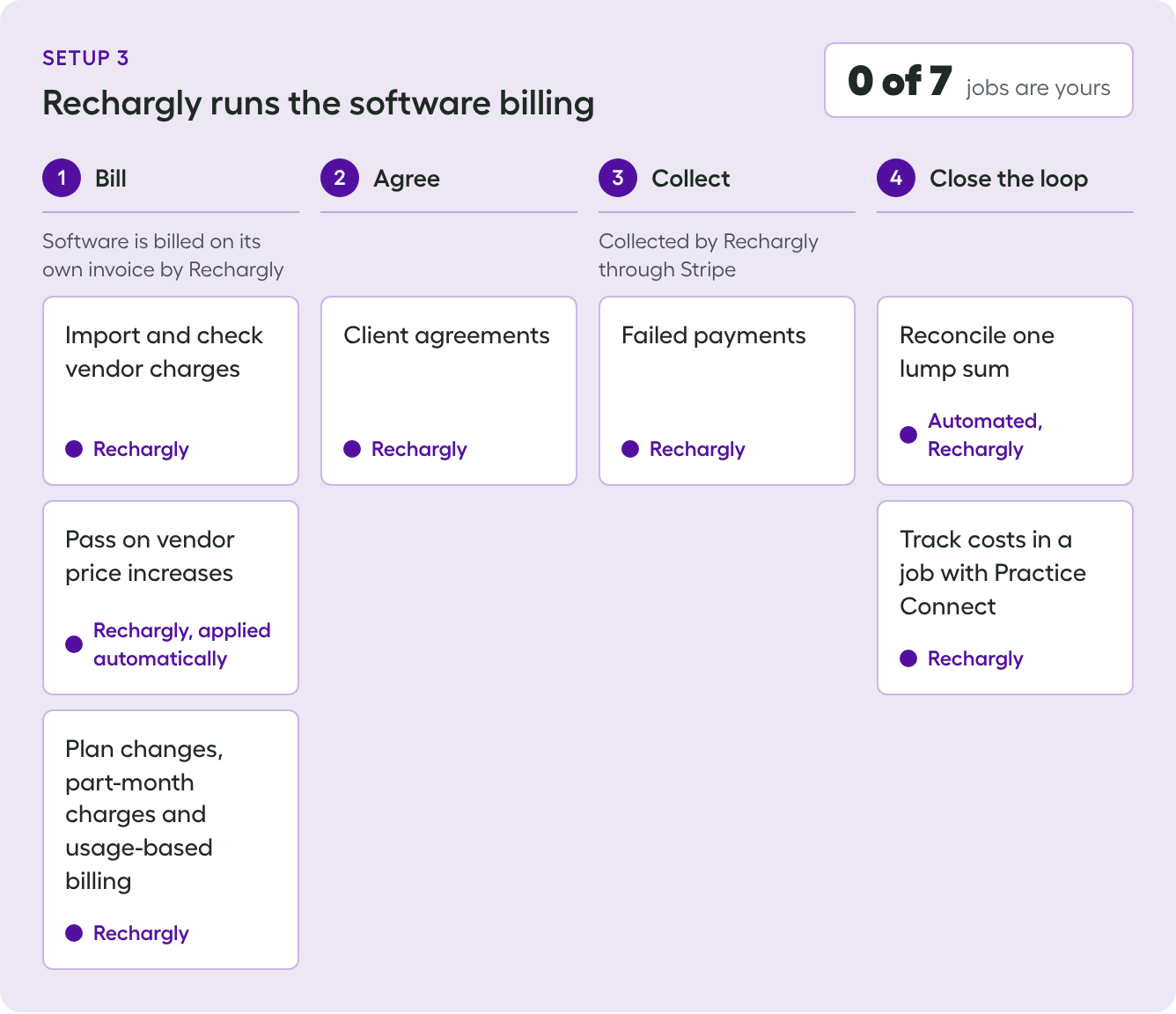
Ignition stays for engagement letters and services. Rechargly bills the software separately, on its own invoice, and collects through Stripe.
You do
- Explain the second invoice to clients when you move
- Follow up with the client if a payment still fails
Rechargly does
- Imports and checks the vendor charges
- Captures plan changes as they happen, with no proposal edits, so each client stays on the right plan
- Applies vendor price rises automatically and checks them against the vendor charges
- Bills part-month and usage-based charges as the vendor charges them
- Collects through Stripe and handles failed payments
- Reconciles one lump sum deposit through a clearinghouse
- Tracks costs in a job with Practice Connect, in your practice manager
Ignition does
- Engagement letters and services, as it does today
Best for: firms where plans drift, price rises get missed and you absorb the difference.
Trade-off: clients get two invoices, one for your services and one for the software. Most practices make the move at renewal, when client agreements are being renewed anyway.
Who does what
Since implementing Rechargly, we have full confidence that our clients are being invoiced accurately.
Ashleigh Turner, Director, Walker Hill. Read the Walker Hill case study
The bottom line
- Option 1 can be fine if you have an admin person who's on top of it, reconciling the vendor charges each month and adjusting proposals.
- Option 2 is the same work, with software kept away from your fees.
- Option 3 is worth it if nobody is doing that work. Then there's leakage: plans drift, price rises get missed and you absorb the difference. The trade-off is that clients get a second invoice, from Rechargly.
If you're on option 1 or 2 and want to move to option 3, let us know and we'll do the migration for you:
- Clients paying from a bank account can be moved without doing anything
- Clients paying by credit card can't be moved yet
- Clients with missing details get a new agreement
Frequently asked questions
Can I keep Ignition and still use Rechargly?
Yes. Ignition can stay for engagement letters and services while Rechargly bills the software separately, on its own invoice, and collects through Stripe.
Doesn't updating the price in my service library solve it?
For vendor price rises, yes. Change the price once and it flows to every agreement with that service. It doesn't cover plan changes, part-month charges or vendors that bill on usage. Those mean editing each client's agreed services, and reconciling vendor charges to what you bill so you can see what has drifted.
Will my clients get two invoices if Rechargly bills the software?
Yes. One for your services and one for the software. It helps to explain it when you move, and most practices make the move at renewal.
What happens to my clients' payment details if I move software billing to Rechargly?
Any client paying from a bank account can be moved without doing anything. Clients paying by credit card can't be moved yet, and clients with missing details get a new agreement.
Can I move software billing from Ignition to Rechargly later?
Yes. Let us know and we'll do the migration for you.
Can I bill software as a recurring service in Ignition?
Yes, and plenty of practices do. Vendor price rises are covered: you update the service once. Plan changes, part-month charges and usage-based vendors aren't, so someone edits that client's agreed services each time.
Who handles failed payments?
If Ignition collects, Ignition emails the client and retries the payment. If the retry fails, you follow up. If Rechargly collects, we handle them, because we hold the collection.
How does reconciliation work when Rechargly collects?
With Ignition, invoices are marked paid in Xero and a bank rule reconciles the payouts. With Rechargly you get one lump sum deposit, reconciled through a clearinghouse.
How do I track costs in a job in my practice manager?
With Practice Connect, costs can be pushed to a Rechargly managed job or to an existing job that you've already created. If the software stays in Ignition, someone imports the cost every month, and it's easy to skip.